FYI

Promise me you won’t fail like this

December 15th, 2010  |  Published in FYI, Free Software, KDE, Kubuntu, Linux, Open-Source, Personal, Ubuntu

UPDATE: after just over 2 days, all of my whining may have paid off. I woke up 12/15 to find my GMail working again. I would like to think a Google employee who contacted me on Twitter got it fixed or at least escalated for me.
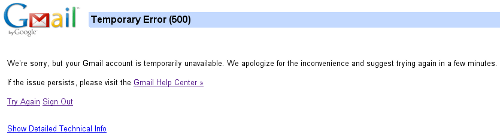
If you can’t read what that says, here it is:
Temporary Error(500)
We’re sorry, but your Gmail account is temporarily unavailable. We apologize for the inconvenience and suggest trying again in a few minutes.

Well, 2 days later, not a few minutes, it is still dead. So I did what everyone else would do in a situation like this, I head to Tech Support. Yeah, like you, I couldn’t find a clear tech support channel either. I did find a bunch of documentation that didn’t pertain to the situation, and what documentation I did find, didn’t help the situation. Well, luckily I found a contact link, actually I found 2, maybe 3, different contact links, to report the issue. So I did, all 3 times. I waited with another email account, thanks Yahoo! for working! And I am still waiting, over 24 hours later. Next step, the amazing Google Forums, or whatever the hell they call that.

So I post my problem initially with a subject of Temporary Error(500) - Numeric Code: 93. This didn’t even draw in a response. So, I did something I can’t stand, I said screw bumping the thread, let me create one with a subject that shows a little panic. I added the info they asked for, I told them everything I have gone to from Google and GMail to rectify the situation, and none of it works. Wouldn’t you know, my subject draws someone in, and their first response is:

Did you check this link? Have you done this?

At this point I have steam coming out of my ears. How in the hell could you ask me that question if you read my initial post? How? I don’t get it? Supposedly this person is a ‘Level 4′, whatever the hell that means. I think they give you a level by the amount of posts you get. I did a little research on this person, and wouldn’t you know it, they are doing the same shit in every one of the other HELP ME! posts in the forums. Oh, this is part of the reason I can’t stand forums.

I have done everything. I hit Twitter, messaged people who work on GMail, everything, except fly to Mountain View and grab the first ass I saw riding some foldable bicycle coming out of one of their numerous gyms or campus hot spots there, and choking them until my GMail worked again. So now I have resorted to my blog, and I am hoping that just 1 of the 3 people who read my blog, knows someone who knows someone.

I am seriously at a standstill here. Everyone of my email addresses forward to my GMail account. It is kind of like my digital lifeline. I have a few major tasks, one including Christmas presents and lists, that I have to do like yesterday, but I can’t. I have an Android that is damn near useless to me right now, except for Angry Birds and Bubble Blast 2.

OK, so to my other point. What ever we all do with this wonderful world of free and open source software, lets never get this bad when it comes to getting some sort of support for a free product. Yes, we have docs, we have forums, we have IRC, and we have, well we have everything one needs to get something fixed. I don’t think in all of my years of working on Linux, Ubuntu/Kubuntu, KDE, you name it, I have had to wait a day, let alone 2 or more, to get something fixed. Well, get something fixed that is as important as your email. If you want to make sure you don’t fail with your product, just head over to GMail support, look it over, and promise not only yourself, but everyone of your users, that you will never be like that!

OK, my venting, or dribble, is done here. Everyone enjoy your day and the rest of your week!

NOTE: I have another GMail account for cycling stuff that works perfectly. I have tried no less than 6 other browsers, 2 other operating systems, cleared cache, history, cookies, and candy bars.

OfflineIMAP and Byobu hacks

October 18th, 2010  |  Published in FYI, Tutorial

Just a quick post showing a couple of hacks I have done using OfflineIMAP and Byobu on my server. I use OfflineIMAP to download my email from GMail and then use Mutt to read that email. I use Byobu on my server because I run Irssi, Mutt, and a shell, and of course Byobu makes this easy. So here we go.

OfflineIMAP
First, here is my ~/.offlineimaprc configuration:

[general]
metadata = ~/.offlineimap
accounts = GMAIL
maxsyncaccounts = 1
ui = Noninteractive.Quiet
 
[Account GMAIL]
localrepository = LocalGmail
remoterepository = RemoteGmail
 
[Repository LocalGmail]
type = Maildir
localfolders = ~/.maildb/GMAIL
#restoretime = no
 
[Repository RemoteGmail]
type = Gmail
remotehost = imap.gmail.com
remoteuser = your_gmail_login@gmail.com
remotepass = your_gmail_password
ssl = yes
realdelete = no

To fire off OfflineIMAP, I use a cronjob:

*/5 * * * * $HOME/bin/cron-run-offlineimap.sh

And my ~/bin/cron-run-offlineimap.sh looks like this:

#!/bin/sh
ps aux | grep "\/usr\/bin\/offlineimap"
if [ $? -eq "0" ]; then
    logger -i -t offlineimap "Another instance of offlineimap running. Exiting."
    exit 0
else
    logger -i -t offlineimap "Starting offlineimap..."
    chmod +x $HOME/.byobu/bin/1234_OFFLINEIMAP
    offlineimap
    logger -i -t offlineimap "Done offlineimap..."
    chmod -x $HOME/.byobu/bin/1234_OFFLINEIMAP
    exit 0
fi

You can see that this script changes the file mode bits to executable when it runs, and removes the executable bit when it finishes, on the ~/.byobu/bibn/1234_OFFLINEIMAP file which is a Byobu script.

Byobu
Here is what ~/.byobu/bin/1234_OFFLINEIMAP looks like:

#!/bin/sh
printf "\005{= rw}IMAP\005{-}"

So now every time my OfflineIMAP cronjob runs, I will get IMAP in my Byobu bar.

A super simple hack that lets me know when OfflineIMAP is running. Another reason I use this is because sometimes OfflineIMAP hangs, and when it does, I will know this if IMAP stays displayed in Byobu after a minute or so. Then I can check /var/log/syslog to see exactly when OfflineIMAP started. Normally OfflineIMAP runs for about a minute on my server every check. This could all be streamlined into one script as well with Byobu, but I know you don’t want to fire off processes or other things that may cause resource hogging.

I am still here

August 3rd, 2010  |  Published in FYI, KDE, Kubuntu, Ubuntu

Hey there my Ubuntu and KDE people! I am still around. I have my daughter for most of the month of August so I am currently AFK. I will be back in a couple of weeks full-time again. In the mean time if you need to get in touch with me, hit me up on Twitter @nixternal, or if you have my phone number you can call me there.

When I come back, I have a great review in the pipeline of a new ZaReason laptop that runs Kubuntu out of the box!

My daughter and I have been having a blast these past couple of weeks. We have enjoyed the weather, watched a lot of bike racing, and she got groovy with Ubuntu. She likes Kubuntu’s look better, but I hooked her up with some Ubuntu to play around with. She wasn’t down with the default look, so we found some themes, colors, and fonts, that she likes, and thus far she has been happy. I need more than an SSH backdoor, so if you have any ideas let me know. I would like to know when she logs on and gets online, but I would really like to know is her IP address automagically so I can connect and do updates and what not for her. I can probably do most of this with a little bit of scripting, but I am sure that 100% of the time she will be behind a firewall that doesn’t have ports for SSH open, so if there is something out there that you know I might be looking for, let me know. Oh, I need to figure out a way to prevent her pesky mom or grandparents from installing Windows on this machine, any ideas on that as well?

Oh, and Elizabeth, she one-upped you. She has pink braces :p

My daughter, myself, and Chris Horner from Team Radio Shack

Let me tell you where to put the buttons…

March 5th, 2010  |  Published in FYI, KDE

You really don’t want me to tell you where to put them, as you might not like the answer. However, with KDE, you can put the buttons wherever you would like Daviey, Mike, and everyone else.

No need for some confusing application or editor, simply configure the location of the buttons as you would like them to be. You can drag stuff where you want, click apply and test the results. Tweak until you are happy.

Freenode IRC - Connect And Auth Securely

January 30th, 2010  |  Published in FYI, Tutorial

OK, so today freenode migrated to their new server. It was a bit rough around the edges at first, however they have finally added support for connecting via SSL and using a script in Irssi you can authenticate via SASL. So, I will quickly show you how to get SSL and SASL setup for Irssi and Irssi only, and I am assuming you already have a connection to Freenode already setup.

WARNING: It has been brought to my attention that the Irssi folks get mad when people tell you to edit the config file instead of using the commands, so with that, backup your config file first, and if anything goes wrong, not my fault :)

  1. Let’s install the necessary packages (I think this is all, I already had openssl installed but had to install the libcrypt- packages for the SASL script below):
    sudo apt-get install openssl libcrypt-openssl-bignum-perl libcrypt-dh-perl libcrypt-blowfish-perl
  2. Grab and save the cap_sasl.pl script to ~/.irssi/scripts and setup a link for it to autorun:
    cd ~/.irssi/scripts
    wget http://www.freenode.net/sasl/cap_sasl.pl
    mkdir autorun  ## only if you do not have this directory already
    cd autorun
    ln -s ../cap_sasl.pl .
  3. Fire up Irssi without connecting to anything:
    irssi -!
  4. Once in Irssi, setup your username and password for SASL:
    /sasl set freenode your_nick your_password DH-BLOWFISH
    /sasl save
    /save
  5. Quit Irssi
  6. Using a text editor, edit ~/.irssi/config and in the section that says servers = ( you want to remove the stuff between the { and } for freenode, and then add the following in its place:
    address = "chat.us.freenode.net";
    chatnet = "freenode";
    port = "7000";
    use_ssl = "yes";
    ssl_verify = "yes";
    ssl_capath = "/etc/ssl/certs";
    autoconnect = "yes";
  7. Now under the chatnets = ( section, you want the freenode = part to be changed to:
    freenode = { type = "IRC"; };

If you get a message about your nick being “Juped” or “temporarily unavailable” and get switched to Guestxxxx nick, read the following, otherwise enjoy your new secure connection.

Now you can go ahead and connect to IRC like you are used to. If you have the ENFORCE flag set for your nickname, you may come across some issues with identifying, and the one message I kept getting was:

Nick nixternal is Juped

If you get this, you need to disable the ENFORCE flag on your nick (make sure you are identified with your correct nick first):

/msg nickserv set enforce off

After that, disconnect from IRC, then reconnect to IRC. You shouldn’t be getting that error message now. If you do, go to #freenode and complain accordingly :) If all is well, you can go ahead and set the ENFORCE flag back to on:

/msg nickserv set enforce on

Now all should be well. Enjoy your new secure, SSL and SASL authentication, connection.

CSS Border Radius

June 19th, 2009  |  Published in Coding, Development, FYI, KDE, Personal, Tutorial

I am really just adding this so I have it documented in case I forget it in the future or need to reference it. One thing I like to do when messing around with web development is when I use a table to hold something, instead of a silly div (really on wiki pages and such to create cheap button-like objects), is use a round border. So here are the example on how to use round borders for tables, utilizing border-radius and CSS.

Firefox

/* 5px radius on all 4 corners of the table */
-moz-border-radius: 5px;
/* 5px radius on top left and bottom right corners only */
-moz-border-radius: 5px 0 5px 0;
/* 5px radius on bottom left and top right corners only */
-moz-border-radius: 0 5px 0 5px;
/* 5px radius on the top left corner only */
-moz-border-radius-topleft: 5px;
/* 5px radius on the bottom left corner only */
-moz-border-radius-bottomleft: 5px;
/* 5px radius on the top right corner only */
-moz-border-radius-topright: 5px;
/* 5px radius on the bottom right corner only */
-moz-border-radius-bottomright: 5px;

CSS 3

/* 5px radius on all 4 corners of the table */
border-radius: 5px;
/* 5px radius on top left and bottom right corners only */
border-radius: 5px 0 5px 0;
/* 5px radius on bottom left and top right corners only */
border-radius: 0 5px 0 5px;
/* 5px radius on the top left corner only */
border-top-left-radius: 5px;
/* 5px radius on the bottom left corner only */
border-bottom-left-radius: 5px;
/* 5px radius on the top right corner only */
border-top-right-radius: 5px;
/* 5px radius on the bottom right corner only */
border-bottom-right-radius: 5px;

Webkit

/* Just add -webkit- in front of the CSS 3 styles */
-webkit-border-top-right-radius: 5px;

KHTML (Konqueror)

/* Just add -khtml- in front of the CSS 3 styles */
-khtml-border-radius: 5px;

And with that said, Why is there 4, count them 4, different ways to skin the same exact cat? Come on browser devs, lets come together and accept 1 solution and implement it. I have been noticing Ajax-like functions out there to do rounded corners, and now I see why. With like 10 lines of JavaScript, you get this same functionality. Now do this in your style sheet, and 1 table could have as less as 4 lines if it is a simple table, or as many as 16 lines for a bit more complex layout. Anyways, just wanted to keep this documented instead of Googling for it all of the time when I need it, and pass it on to all of you fine folks who are unfortunate enough to read my blog. Plus, I also wanted to pass on how web developers, when utilizing border-radius, can now make a KHTML friendly site :)