Blog

Tweet

Kubuntu QA Feedback Part Two

Yesterday I did a quick, well not so quick, post on some new tasks concerning Kubuntu QA and Feedback. I created a very crude plasmoid that would connect to a web survey so people could provide feedback during the development cycle. The first revision of this plasmoid had a hardcoded URL to the survey in question. So that meant that for every Alpha or RC release during the cycle, we would have to update the plasmoid with the new survey URL. This would become a pain. So I went forward trying to figure out a way to automagically handle this stuff.

My first initiative was to keep the plasmoid super simple and not have it do a lot of processing and stuff to figure out what to do. So enter PHP. I added a script on the server that the plasmoid will connect to. The only processing the plasmoid has to do is withlsb_release. When used with the flag-d,lsb_release will return only the “Description” of the current release of your system. This can be used to determine if the release is a stable release, or if it is a development release. Here are 2 example outputs to show this:

Stable:

lsb_release_stable

Development:
lsb_release_dev

QUIZ: Can you figure out the names of my computers from the 2 screenshots and how or why I named them? Jono, Jorge, and a few others over there in Michigan and here in Chicago, don’t answer! See if you can do this without Googling :)

So with the stable version, you can see the last bit in the line is the version number, in this case 9.04. In the development version instead of having the 9.04 it instead has karmic. So which ever value that the plasmoid gets when doing this it sends to the script like this:
http://foo.bar.com/foo.php?ver=9.04
If it is a development release, then it connects withver=karmic.

Once the script gets that, it then does its magic. It first checks if the$ver is a string or a float. If it is a string, then it takes the string and looks overhttp://cdimage.ubuntu.com/kubuntu/releases/$ver. It parses the HTML and looks for the latest release under$ver. That then returns whatever the latest release is on the development side only. If$ver is a float, then it parses the HTML of the public survey list and matches up version numbers. Once either of these are complete, the$SID is returned, which is the last part of the URL to the respected survey. Then the PHP script magically redirects the plasmoid to the correct survey.

So with that, I think the Kubuntu Team is in good shape to have this as part of the Alpha 3 release, and possibly even sooner. I would still like to take this beyond a plasmoid and look at creating some sort of application for the desktop that can do everything for everybody, this way here we can pass it around to the rest of the distros so they can use it during their development cycles as well. If you have any ideas, please pass them on, or start hacking on it. I would be willing to lend a hand when the time warrants.
Posted in Development, Linux | Tagged , | 2 Comments
Tweet

Kubuntu QA and Feedback

Yesterday I decided that I would start tackling the QA side of things on the Todo List for Kubuntu Karmic. So with that I will be creating a QA policy for Kubuntu, which I am sure I build off of the current policies and guidelines for Ubuntu and other distros, since the work is already done pretty much, for the GNOME side of things. That’s what hackers do right? We hack together stuff until we get what we want :)

Well, one of the projects I have been tasked with is to create some sort of feedback system for Kubuntu. In the past we had utilized the wiki but this ended up being more of an inconvenience than anything. What would happen is on release day, everyone goes and gets their fresh Kubuntu download, and heads over to do some feedback. You know what happens when multiple people start editing a wiki page at the same time without realizing that it is locked by another user. CONFLICTS! So with that said, I headed on out to start working on some sort of feedback system that we could access with a plasmoid. After researching my options, which unbelievably there aren’t many, I landed my first alpha release utilizing Lime Survey (an awesome open source survey application) and created a quick plasmoid utilzing Plasma.WebView in Python. Literally, the plasmoid took me about 5 minutes from start to finish, it is that crude and simple right now.

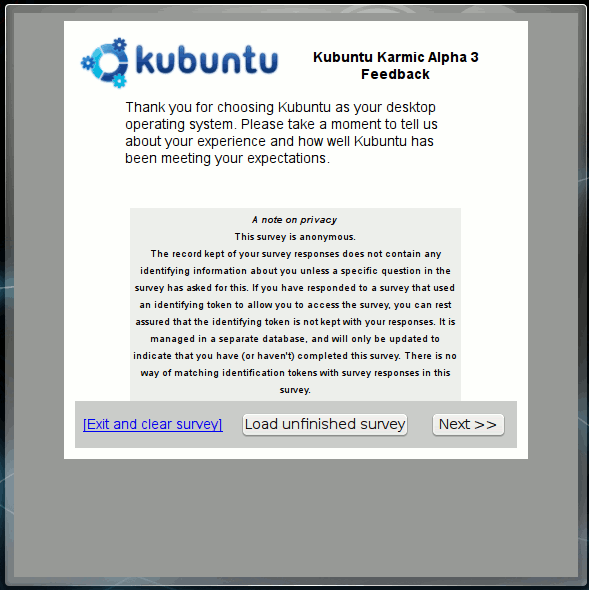
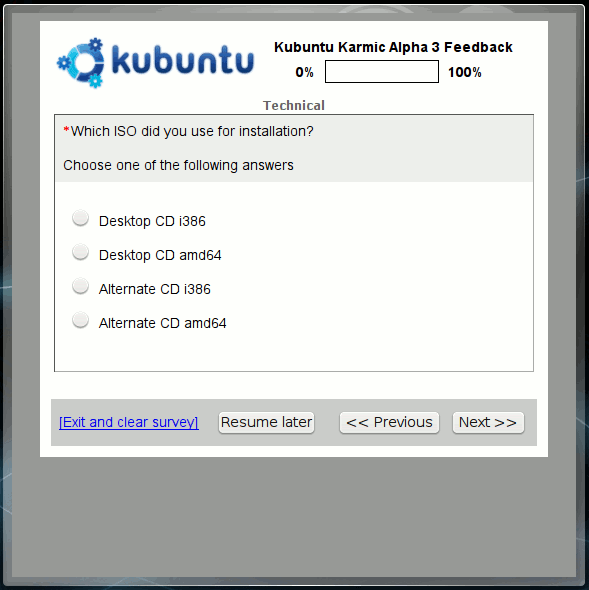
Here are a couple screenshots of what it currently looks like in action:

feedback1

feedback2

It works, so that qualified it for a quick alpha to let people see it in action and hopefully come up with some ideas.

I have come up with a couple of ideas for the plasmoid because of a simple design flaw. Utilizing the plasmoid will only work during a Live CD session or after Kubuntu is installed and running. Now we all know that during a development cycle not everyone can have the luxury of a Live CD or an install going as planned. Because of this, the plasmoid would be useless, therefor causing us to go back to an archaic method of filling in the feedback. The Internet! At least we have the Internet. Some things I would also like to incorporate, which is probably just another 5 minutes with the plasmoid, is the ability to work on the survey offline, and then syncing as soon as you come online.

So with that said now, I decided that the Linux desktop platforms could really use a good feedback application. One that ties into the desktop and submits results back to a central location. So I got to thinking. How about doing it like 5-a-day is done using bzr? Nah, then I thought some more. How about something like the Ubuntu and Debian Popularity Contest? OK, so the backend/server/database part would be fairly simple and straight forward. Now the frontend part. How would the application work? So I thought about XML files that contained the feedback questions and configuration. So far, this makes the most sense, but isn’t XML such a pain, the ball-and-chain for Python? I have so many ideas on how to go forth with this, now I just need to make some time and start playing around with ideas. What do you all think?

Download Here

Once it is downloaded, you can install it by using the “Add Widgets” dialog or via the command line by doing:

plasmapkg -i kubuntu-qa-feedback.plasmoid

Then you can add it to your desktop using the “Add Widgets” dialog or test it out via the command line by doing:

plasmoidviewer kubuntu-qa-feedback

That’s it from me tonight, goodnight world and happy hacking!

Posted in Development, Linux | Tagged , | 3 Comments
Tweet

Kubuntu and Apport love

So, I decided to take all of the Apport related TODO items the other day and I am almost complete with all of them. Today I portedapport-qt toapport-kde, which means went from PyQt4 to PyKDE4 loveliness. Spent some time testing it and working out the bugs and I think it is good thus far. I am sure we will have to do some tweaks to it, but it is a great start.

Another item on the TODO list was to convert theHelp->Report Bug… menu item to utilize Apport to file bug reports to Launchpad instead of going straight to KDE Bugzilla. In the future I will probably look at having both implemented, but that will need to be discussed further, probably with the KDE and Kubuntu people, as well as Celeste on usability.

Next step, something about all of the apps and Apport, so I will probably start working on hooks for the apps so we can get some better reports. Like always, I will keep you tuned in. Time for bed, good night!

Posted in Application, Development, Linux | Tagged , | 7 Comments
  • Subscribe to nixternal.com

     Subscribe in a reader

    Or, subscribe via email:
    Enter your email address:

  • Archives

semidetached
semidetached
semidetached
semidetached
